Throwing Shade
Learning the basics of shaders
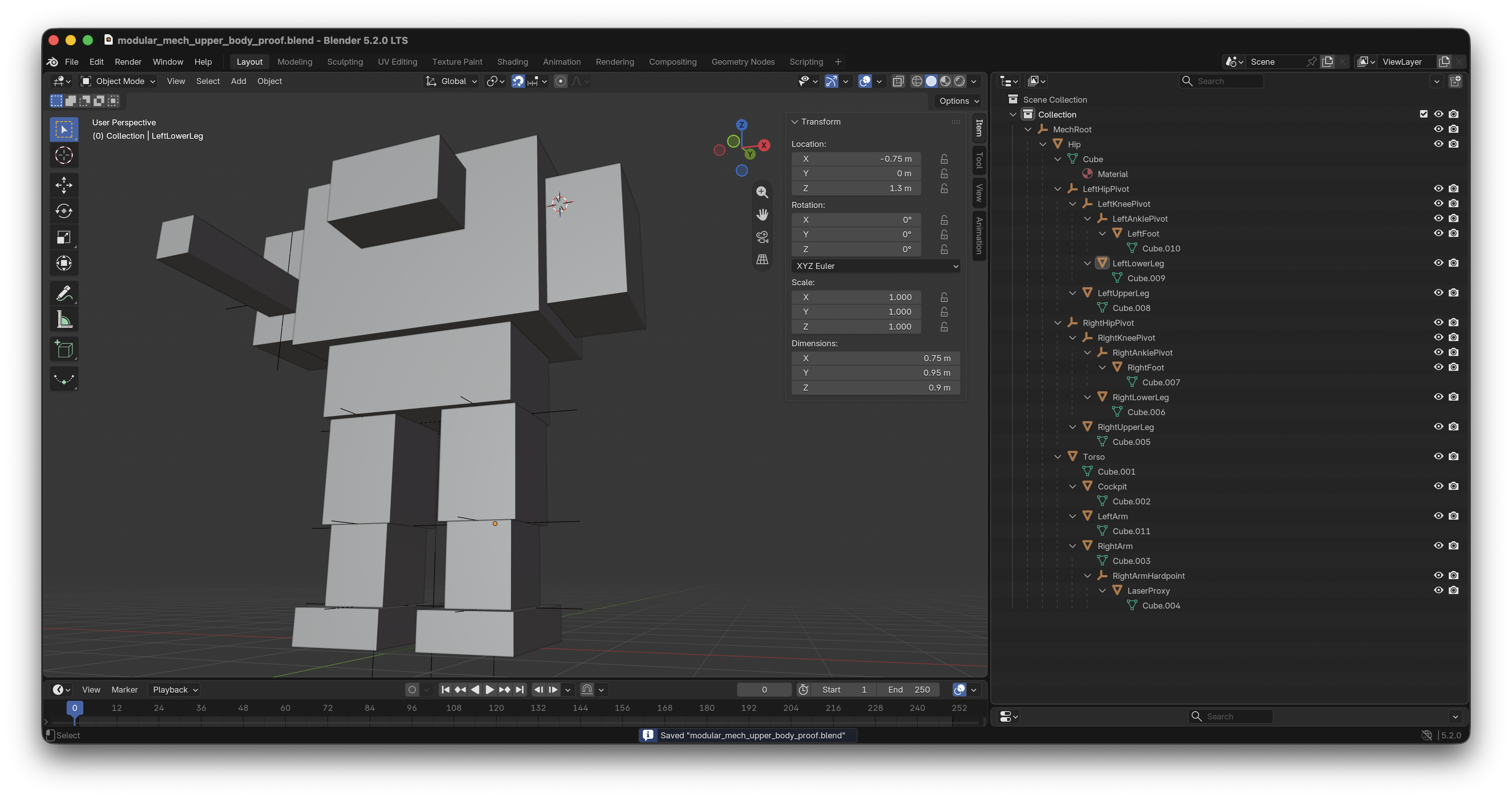
Since my last update, I got introduced to the basics of using Blender to build 3D models, and how to export them so they're importable into Godot. Here's a little example of a rudimentary model I built for my game prototype:
I've had a rough idea of what a shader is for a long time, but never really understood anything about how they work. Let me explain the basics of what they are before continuing.
Shader Basics
In a 3D game, in order to draw a single frame of visual content to put on the screen, the game engine has to reason about everything that is currently within the viewport. If you think of your screen as a window through which you look into the game world, we're talking about everything that's visible in that window. In order to do this, it delegates the computation of visual information to other subsystems in the game, and ultimately to each object in the game. As a result, each object in the game has to be able to tell the rest of the game engine things about itself.
A 3D mesh can have one or more surfaces, and those surfaces are generally constructed from triangles. When your computer's GPU draws a triangle, it determines which pixels on the screen that triangle covers. Godot then calls the shader's fragment() function once (or more!) for each pixel the object draws, allowing the shader to set the material properties at that point. This can happen again every rendered frame.
In Practice
Here's a shader that gippity wrote and I modified:
shader_type spatial;

uniform vec4 base_color : source_color = vec4(0.12, 0.32, 0.75, 1.0);
uniform float roughness : hint_range(0.0, 1.0, 0.01) = 0.70;
uniform vec4 wear_color : source_color = vec4(0.18, 0.20, 0.22, 1.0);
uniform float wear_amount : hint_range(0.0, 1.0, 0.01) = 0.0;
uniform float wear_scale : hint_range(1.0, 64.0, 1.0) = 24.0;
uniform float wear_roughness : hint_range(0.0, 1.0, 0.01) = 0.25;

float random_value(vec2 position) {
    return fract(sin(dot(position, vec2(12.9898, 78.233))) * 43758.5453);
}

void fragment() {
    vec2 wear_cell = floor(UV * wear_scale);
    float wear_noise = random_value(wear_cell);
    float wear_mask = step(1.0 - wear_amount, wear_noise);

    ALBEDO = mix(base_color.rgb, wear_color.rgb, wear_mask);
    ROUGHNESS = mix(roughness, wear_roughness, wear_mask);
    METALLIC = mix(0.0, 1.0, wear_mask);
}
The above shader produces the pattern you see on the red models in this image:
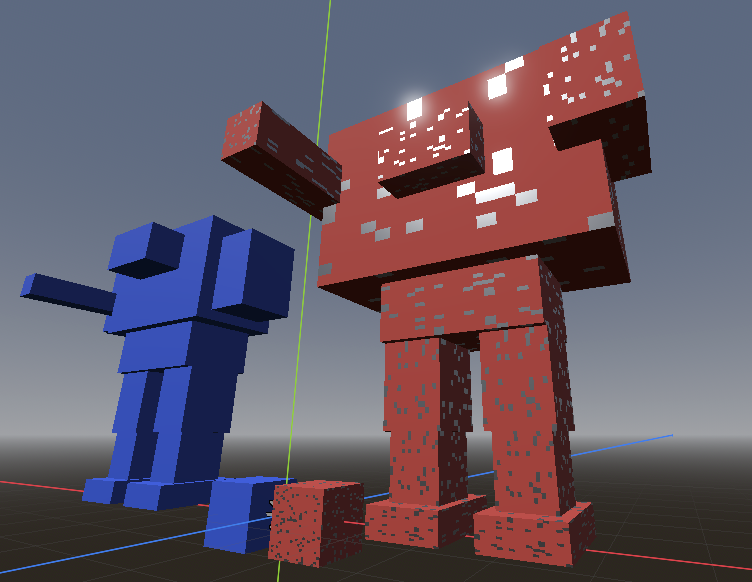
For each pixel covered by the mesh, the shader's fragment() function is called. Godot supplies the function with built-in input values and gives it built-in output values that it can set. These are the all-caps names in the code.
For example, UV is an input containing the texture coordinate for the current fragment. ALBEDO, ROUGHNESS, and METALLIC are outputs that describe how the material should behave at that fragment. ALBEDO is the material's base color, rather than the final color displayed on the screen. Godot still has to combine it with lighting, shadows, roughness, metalness, and other effects.
Additionally, you can add your own data properties. You can see six of these at the top of the code snippet. Each variable marked with uniform is a value that is externally supplied. In the game editor, these are exposed and editable in the inspector. Here's all of that together:
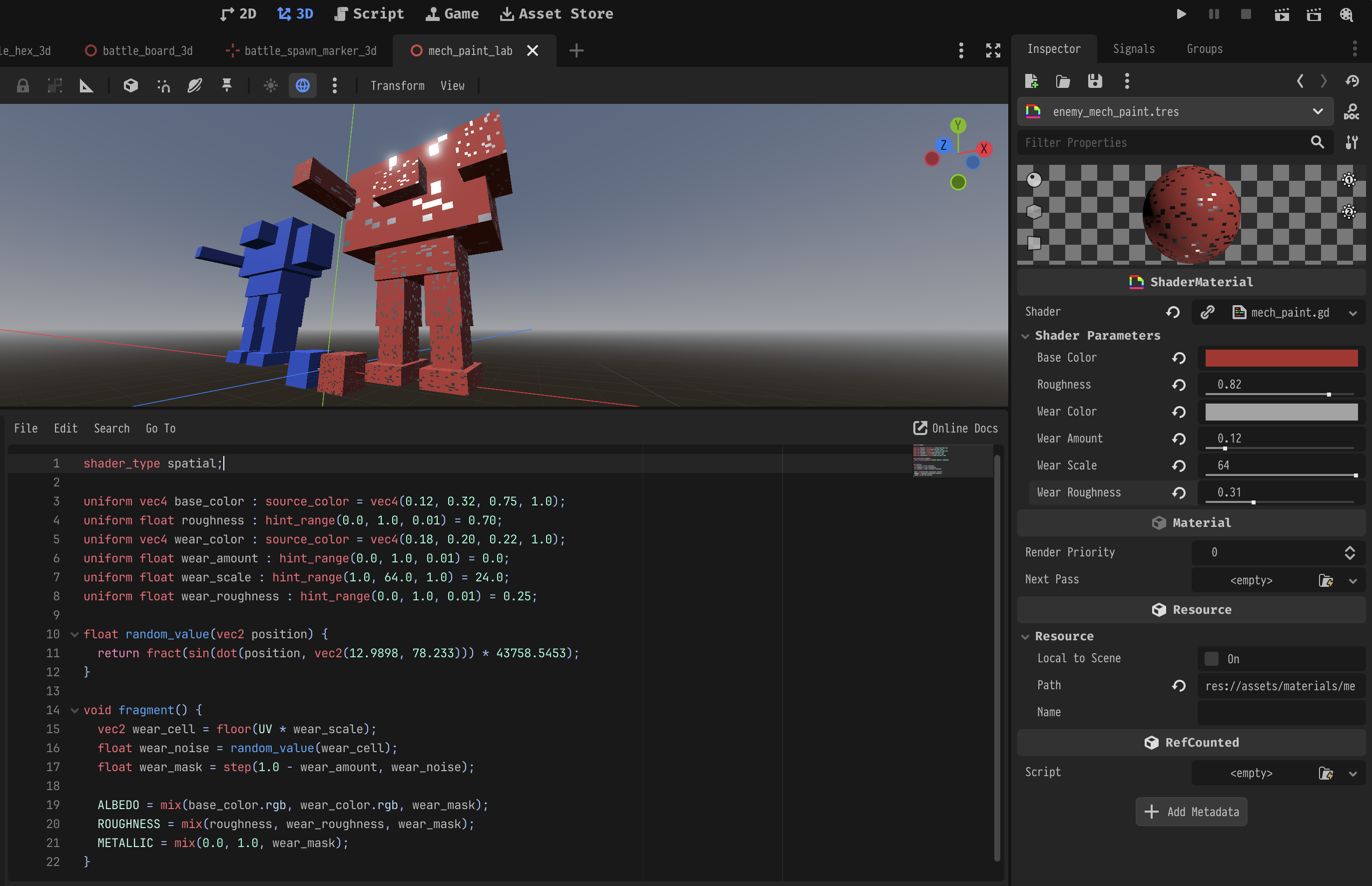
You can see base_color in the shader shows up as "Base Color" in the right-hand inspector, wear_amount as "Wear Amount", etc.
Things I Wasn't Expecting
I was surprised to learn that UV isn't a pixel coordinate. UV coordinates are commonly represented within a 0–1 range, and thus describe a proportions of the texture rather than actual pixel positions.
A typical UV domain can be pictured like this:
(0, 1) ───────── (1, 1)
  │                 │
  │   (0.5, 0.5)    │
  │                 │
(0, 0) ───────── (1, 0)
So, vertical is in the range of 0-1 from bottom to top, and horizontal is 0-1 from left to right. As a result, the center remains (0.5, 0.5) whether the texture is 256×256 or 4096×4096.
Also, for some reason, I expected the shader's fragment() function to receive a time component, similar to the way a Node's _process(delta) function receives the elapsed time since its previous call. I was surprised to discover that a shader's local state seems to be time agnostic.
I predict that will become less strange the more I think about it.
What my shader does
void fragment() {
    vec2 wear_cell = floor(UV * wear_scale);
    float wear_noise = random_value(wear_cell);
    float wear_mask = step(1.0 - wear_amount, wear_noise);

    ALBEDO = mix(base_color.rgb, wear_color.rgb, wear_mask);
    ROUGHNESS = mix(roughness, wear_roughness, wear_mask);
    METALLIC = mix(0.0, 1.0, wear_mask);
}
At a high-level, this code divides the UV space a regular grid of cells, and then determines if each cell should appear painted or worn. Based on that determination, the albedo, roughness, and metallic built-ins are modified for that coordinate.
vec2 wear_cell = floor(UV * wear_scale) multiplies our 0-1 UV coordinates by the "Wear Scale" value (1-64) from the game editor, and then chops off the fractional content of each value, so the values are now whole-number values. Think of that pair of values like a label we put on a bucket. Nearby UV coordinates that produce the same "label" belong in the same bucket (are in the same cell), so they ultimately receive the same painted or worn appearance.
float wear_noise = random_value(wear_cell) calls into the random_value(_:) helper function defined above it. Let's think of the word "random" as being in air quotes, because this function is 100% deterministic and, given the same input, will always produce the same output. If it didn't, the texture would flicker constantly, as it would look different for every frame of the game. What it does do however, is give the distribution of worn and un-worn cells on our surface a seemingly random distribution. Basically, it takes a given vector (our "bucket" from the last line), and returns a pseudo-random value x where 0.0 <= x < 1.0. So, since the function is deterministic, then all of those coordinates that are grouped into cells get the same wear_noise value.
float wear_mask = step(1.0 - wear_amount, wear_noise) gives us either 0 or 1 based on wear_noise. The step(edge, x) function returns 0 when x is less than edge; otherwise, it returns 1.
Here, 1.0 - wear_amount is the threshold and wear_noise is the value being tested. Increasing wear_amount lowers the threshold, allowing more wear_noise values to meet or exceed it and produce 1. Because wear_noise behaves approximately like a random value between 0 and 1, wear_amount roughly represents the proportion of cells that will be worn. For example, a wear_amount of 0.20 produces a threshold of 0.80, so roughly 20% of the cells return 1.
A resulting wear_mask value of 0 means the coordinate is painted or unworn, while 1 means it is worn or bare.
Play around with the "wear scale" and "wear amount" sliders on the demo below to get a sense of how the values interact with each other:
The final three lines use wear_mask to set the material properties for the current fragment:
ALBEDO = mix(base_color.rgb, wear_color.rgb, wear_mask);
ROUGHNESS = mix(roughness, wear_roughness, wear_mask);
METALLIC = mix(0.0, 1.0, wear_mask);ALBEDOreceives the RGB portion of eitherbase_colororwear_color.ROUGHNESSreceivesroughnessfor painted cells orwear_roughnessfor worn cells.METALLICreceives0for painted cells or1for worn cells. In this material model, that means the painted surface is treated as nonmetallic and the exposed surface is treated as bare metal.
Conclusion

Anyway, I don't know if you ended up learning anything from reading this, but I certainly deepened my understanding by writing it!
Sorry, no video for this week's post.