Rays and Projections
Pointing at stuff and having it make sense
Long day today, so I couldn't get a LOT done, but today gippity taught me about using rays to determine line of sight, specifically for my game, to recognize the coordinates on the board that the mouse appears to be pointed at, from the user's perspective. To do that goes like this:
2D mouse position
       ↓ camera projection
3D ray through the scene
       ↓ intersect horizontal board plane
3D point in world space
       ↓ BoardAuthoring.to_local()
3D point in board-local space
So, to start I get the 2D pixel position of the mouse cursor in the viewport (the entire visible area) of the game. Godot gives us that for free. But we're trying to find a point on a 2D plane (the game board) that exists within a 3D game scene. That requires a little more computation.
The camera in my game is orthographic (as opposed to perspective), which means that rather that the line of sight fanning out from a single perspective point, every pixel in the camera points at a pixel directly in front of it, regardless of how far away it is. That is to say that rays (the things I just called lines of sight) are parallel in an orthographic camera, rather than angled outward, like a perspective camera.
Perspective camera:       Orthographic camera:

       \ | /               ↓     ↓     ↓
        \|/                ↓     ↓     ↓
         ● camera          ↓     ↓     ↓
Since I now have a starting position, I put the starting point for a ray at that 2D position of the camera's frame, and then project directly outward through that point outward, orthogonally (literally means at a right angle) from the camera/screen, into the game scene. So I have an origin (the 2D mouse location), and a direction (orthogonally, or "forward" away from the camera/screen), which gives me a ray. (My math major dad would be so proud right now.)
The formula to get a point from a ray goes like this: point = origin + direction × distance
So to find the point on the board, I need to first find the point within the 3D space of the game scene that the ray passes through the board. In 3D space you have three coordinates: (X, Y, Z). The board/ground is flat and level, extending only side to side, which is to say, in X and Z coordinates. That means that it has a constant Y position of 0. That means as I move along the ray, as soon as I encounter a Y of 0, I've reached my intersection point.
                  Y (up)
                  │
mouse ray         │
       \          │
        \         │
         ●────────┼──────── board, at one constant Y
        /         │
       X/Z directions
We can rearrange the formula depending on what data we have and what we're solving for at the moment.
So each frame, I grab the mouse's position, and hand it off to this function to bring it all together:
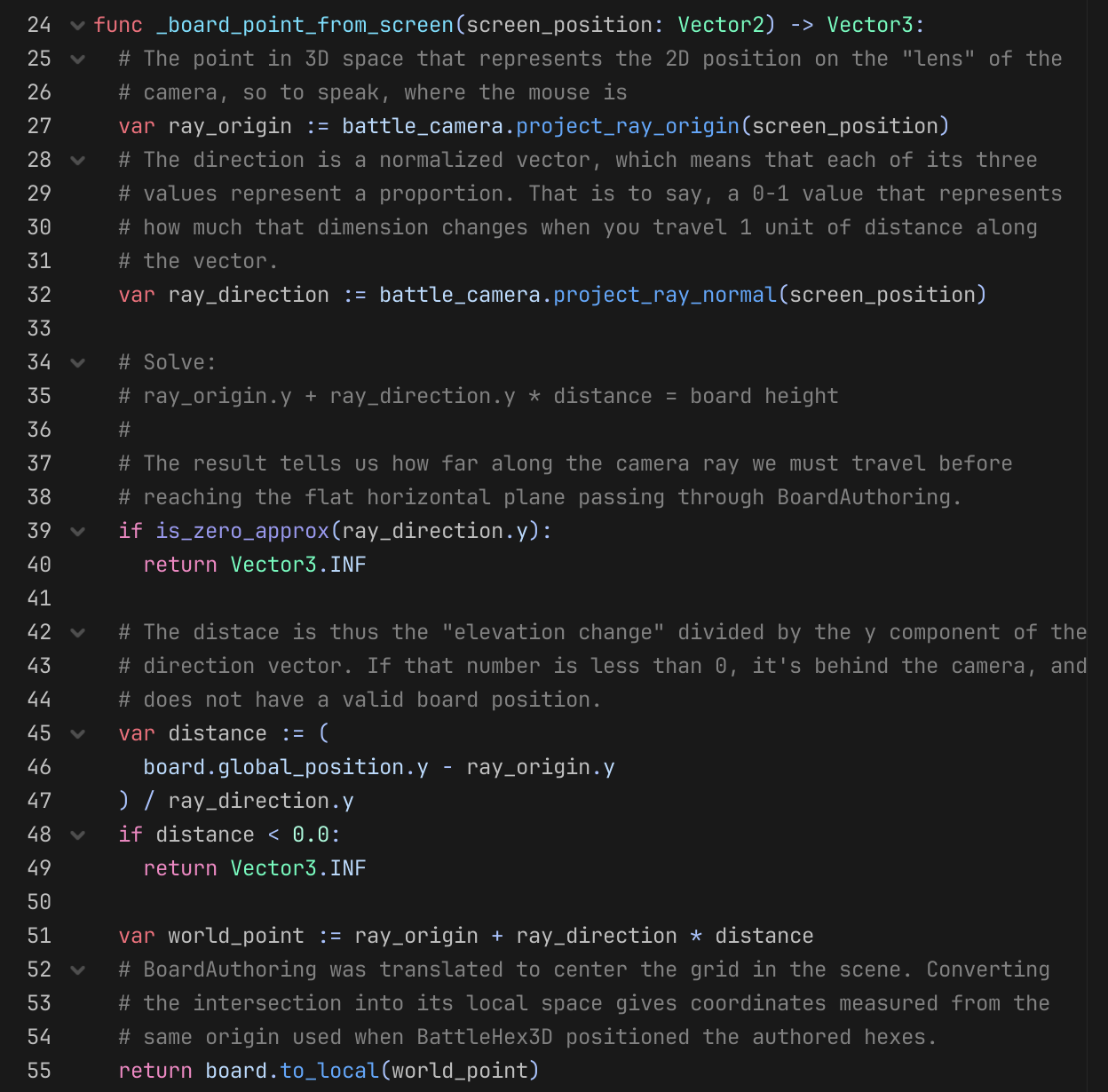
At the end we take that world position, and we hand it off to the board and the board tells us what that position is in its internal coordinate system.
Anyway, here's my mouse's board positition being computed in realtime (board position is displayed in the top left corner):